|
Help Us And Get A License Key Free |
|
If you can help us to translate our software
to your mother tongue, and your document is
accepted by our editor, you will get a free
license key! For example, if you translate Wise
Registry Cleaner to your mother tongue, and we
have accepted your document, you will get a
license key for Wise Registry Cleaner 3 Pro. If
you translate both Wise Registry Cleaner and
Wise Disk Cleaner, and we accept your documents,
you will get two license keys, one for Wise
Registry Cleaner and one for Wise Disk Cleaner. |
|
Language of Wise Registry Cleaner 3.x |
|
|
Update has been completed |
Some entries need to update |
|
|
About translate:
Help us translate our software
into your mother tongue, and get a free License. |
|
|
|
|
Language of Wise Disk Cleaner 3.x |
|
|
Update has been completed |
Some entries need to update |
|
|
About translate:
Help us translate our software
into your mother tongue, and get a free License. |
|
|
|
|
|
Use language pack |
To start using the language pack, please follow
the following steps:
- Right click 'download' above to start
the download.
- Choose the install folder (your install
folder\language\ fox example: save to my install
folder->'D:\tools\Wise Registry Cleaner\Language') and click
'save' button. If the file is .zip file, please un-compression
to <your install folder>\language folder.
- Wait for the file to download, then run
the program, now you can change language in
'option'->'language'.
Need a free zip & unzip tool? Click here
to download the free zip & unzip tool - 7zip.
 |
|
Translate to your mother tongue |
If you can not find a language
pack for your mother tongue in here and you would like to translate
our software to your mother tongue, please follow the following
steps:
- Go to "<your install folder>\language\"
and copy "English(US).ini" into the yourlanguage.ini.
- Open the file - yourlanguage.ini, and
translate text only after symbol "=".
- "TranslationAuthor=" your name.
- "TranslationAuthorEmail=" your email.
- "Version=" currently version.
- After you translate, please E-mail a
copy
to us.
PS:
- Please keep
the entry "ReadHabit=left-to-right" in English, the entry only
can be set to "left-to-right" or "right-to-left".
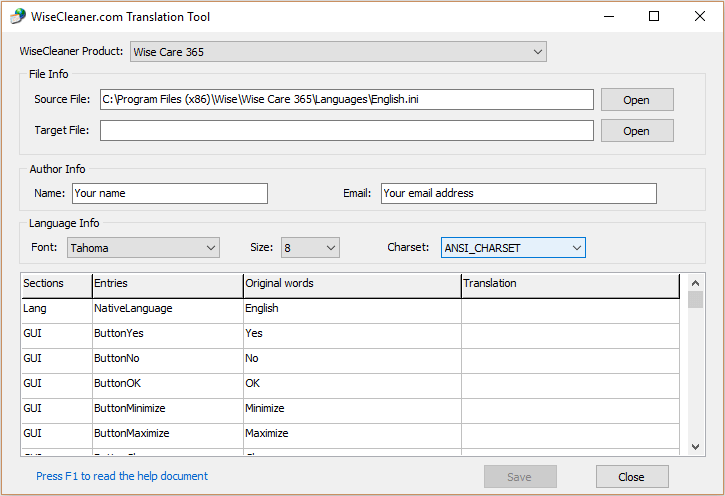
- Now, you can use translator tool to finish this work. Click
here to download the translator
tool. It can help you finish translation work easily.
 |
| |
|